Palette: The Handwritten Typeface That Elevates Handmade Branding
I was staring at a blank canvas, or rather, a blank Canva document, trying to finalize the design for a new line of soy candle labels. I had the wax poured, the wicks trimmed, and the jars cleaned, but the typography felt flat. It lacked that personal touch that makes a customer stop scrolling and click "Add to Cart." That’s when I decided to test-drive Palette, a script amp font from Script Amp designed to feel both classy and contemporary. What started as a quick font swap turned into a complete reimagining of my product presentation, proving that the right typeface can transform a simple label into a premium brand experience.
Why Palette Fits the Modern Maker Aesthetic
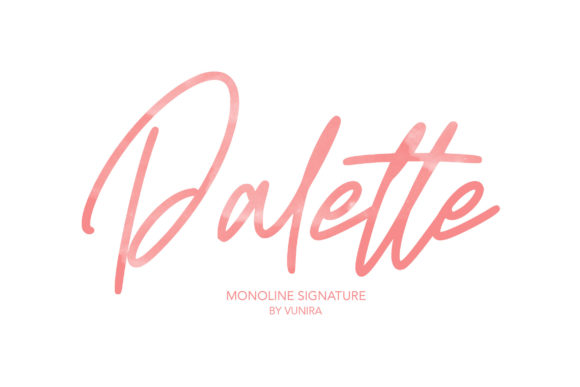
As someone who sells digital printables and physical goods, I am constantly looking for fonts that balance elegance with approachability. Many handwritten fonts lean too heavily into the messy or overly casual, while others feel stiff and traditional. Palette strikes a perfect middle ground. It maintains its calligraphic influences but feels fresh enough for modern shop branding. When I applied it to a mockup of a boutique gift tag, the letters didn’t just sit on the page; they flowed with a natural rhythm that suggested care and attention to detail.
The visual personality of this font is warm and inviting. It has a slight sway to its curves that mimics real penmanship without being difficult to read. This is crucial for handmade sellers because your customers need to instantly recognize what you are selling. Whether I am designing a wedding invitation suite or a set of planner pages, using a creative font like Palette adds an editorial design quality to the layout. It signals to the buyer that this isn’t just a mass-produced item, but something crafted with intention.
Real-World Applications for Your Shop
One of the first things I did after downloading the file was to experiment with different products. Here is how Palette came to life in my actual workflow:
- Candle and Product Labels: I used the main weight of Palette for the product name on my jar labels. Because it is a display font, it commands attention without needing large sizes. Paired with a smaller sans serif font for the scent notes, the label looked balanced and high-end.
- Greeting Cards and Stationery: For a birthday card series, I used Palette for the main greeting. The handwritten style added a personal, heartfelt touch that resonated with buyers looking for unique gifts. It worked beautifully for short phrases, names, and titles.
- Digital Printables and Wall Art: When creating downloadable wall art, I paired Palette with a clean geometric shape. The contrast between the organic script and the structured background made the piece pop. It proved that this typeface works well in minimalist designs where whitespace is key.
- Packaging and Tags: I tested the font on small boutique tags attached to tote bags and shirts. Even at smaller sizes, the ligatures and swashes remained clear, ensuring the brand identity stayed consistent across all packaging materials.
Readability and Cutting Machine Considerations
If you use Cricut or Silhouette machines to create vinyl decals, stickers, or iron-on transfers, readability is paramount. While Palette is beautiful, it is best suited for short phrases, decorative wording, and display use rather than long paragraphs of text. When cutting vinyl for mugs or signs, I found that keeping the text under five words allowed the intricate details of the letters to shine through without becoming muddy.
For sticker sheets and small product labels, I recommend testing your cut files before running a full batch. The varying thickness of the strokes in Palette can sometimes cause issues if the line weight is too thin for your specific blade setting. However, when sized correctly, the font looks stunning on clear vinyl stickers for water bottles or laptop decals, adding a trendy, modern typography element to everyday items.
Font Pairing Strategies
To maximize the impact of Palette, pairing it correctly is essential. Since it is a script font with strong character, it pairs exceptionally well with simple, neutral typefaces. In my recent project, I combined Palette with a bold sans serif font for subheadings. This combination created a hierarchy that guided the eye naturally from the artistic title to the practical information. You might also try pairing it with a classic serif font for a more vintage-inspired look, or a light handwritten font for secondary accents. The key is to let Palette be the star while the supporting font provides structure.
Technical Details and Licensing
Before diving into production, I always check the technical specifications of any new asset. Palette comes with multiple weights and styles, including alternates and swashes that allow for customization. These features are incredibly useful for designers who want to tweak a single letter to fit a specific layout or add a flourish to a logo design. The file formats included were compatible with all major design software, making the transition from download to design seamless.
For handmade business owners, understanding commercial font licensing is non-negotiable. Always verify that your license allows for the sale of physical products, templates, printables, SVG-style designs, merchandise, or digital downloads. Using a commercial font correctly protects your shop from legal issues and ensures you can scale your business confidently. Palette’s licensing terms were clear, allowing me to use it extensively across my Etsy listings and social media graphics without worry.
Elevating Perceived Quality Through Typography
In the crowded marketplace of handmade goods, perception is reality. Customers often judge the quality of a product by its presentation. A poorly chosen font can make a well-crafted item look amateurish, while a thoughtful typeface like Palette can elevate a simple candle or mug to a luxury item. By investing time in selecting the right typography, you are communicating value to your audience. It shows that you care about every detail, from the scent of the wax to the curve of the letter 'P' on the label.
This attention to detail builds brand consistency and customer recognition. When shoppers see that distinctive, elegant script across your packaging, website, and social media posts, they begin to associate those visual cues with your brand’s identity. Over time, this creates an emotional appeal that goes beyond the product itself, fostering loyalty and encouraging repeat purchases.
Final Design Tips for Makers
As you integrate Palette into your own projects, remember to keep the overall composition clean. Avoid cluttering your designs with too many competing elements. Let the font breathe. Use ample whitespace around your text to enhance readability and aesthetic appeal. Whether you are designing seasonal products like holiday tags or year-round items like planner pages, maintaining a cohesive visual language will help your shop stand out. Experiment with color palettes that complement the warm tones of the handwriting, and don’t be afraid to test different layouts until you find the one that feels most authentic to your brand voice.
Ultimately, choosing the right tools for your craft is about finding inspiration in the details. Palette offered exactly that—a blend of classic charm and modern freshness that breathed new life into my designs. By treating typography as a core component of your product development process, you not only improve the visual appeal of your work but also strengthen the connection with your customers. So, go ahead, open your design software, and let Palette help you tell your brand’s story in a way that feels truly handmade and heartfully crafted.